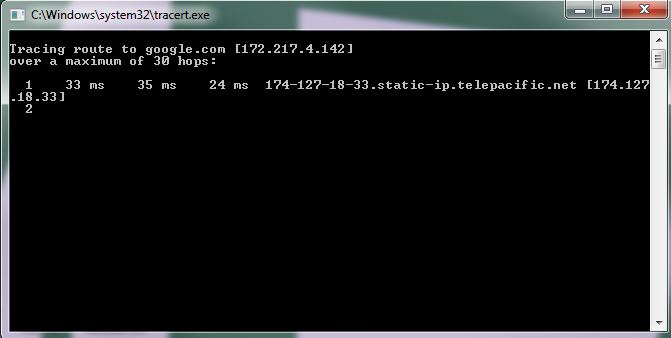
A traceroute tracks how many transfers or hops your computers has to go through on a network before you reach are able to contact another computer/server.
To use a traceroute you will need the other computers IP address (00.000.000.000) or website address (www.website.com).
Directions for Windows
-
- Go to the start menu
- Go to Run
- When Run box pop-up appears type the following
tracert websitename.com
OR
tracert IP Address
***Replace the bold with the destination website or IP address***

What Is The Use of a Traceroute Command?
The tracert command is a prompt that’s used to show several details about the path that a packet takes from the computer or device you’re on to whatever destination you specify. A tracert command can also be referred to as a traceroute command, or a trace route command.
How Does a Traceroute Command Work?
If you’re using Windows on a PC, a traceroute will send ICMP echo requests instead of UDP packets. The hop limit, or time-to-live (TTL) value, will be used to determine the intermediate routers being traversed towards the destination. The router uses an ICMP Time Exceeded message back to the source.
How to Read Your Traceroute
The first column represents the number of networks or stops your information has made while attempting to contact the other computer/server. The next three columns represent the time (in milliseconds) for three different attempts to reach the other computer. The last column is the name of the host that responded to the request.
How do I trace route an IP address?
- Open the Start menu.
- Click on Run.
- Type cmd and then press the OK button to open a command prompt.
- At the prompt, type tracert yourdomain.com and press the Enter key.
- To copy the output, right-click anywhere in the window and select Mark .
- Your done